Posts

Showing posts with the label arduino

Light On & off with smartphone using Arduino UNO

Image
Hello guys In this article I am going to tell you how you can make an easy smartphone-controlled Home Automation system. It is a very easy way to build this project. You need hardware to make:-  Arduino Uno HC -05 Bluetooth Module Single-Channel Relay module AC bulb, Wire, Plug 9-volt battery Or AC to DC power supply You need software to Run:- Arduino IDE ( for upload code to Arduino UNO) Project  code ( Download Arduino code from here ) Remote XY library ( you have to install remote xy library in Arduino IDE) Download Remote Xy android app from play store Connection Arduino Digital pin 3 to HC 05 Bluetooth module RX Arduino Digital pin 2 to HC 05 Bluetooth module TX Arduino  5v to HC 05 Bluetooth module VCC Arduino  gnd to HC 05 Bluetooth module gnd Arduino Digital pin 13 to Relay module signal in pin Arduino vin to Relay module vcc pin Arduino gnd to Relay module gnd pin Important :- Dont touch the circuit ...
How to make a spy camera using ESP-32 cam module

Image
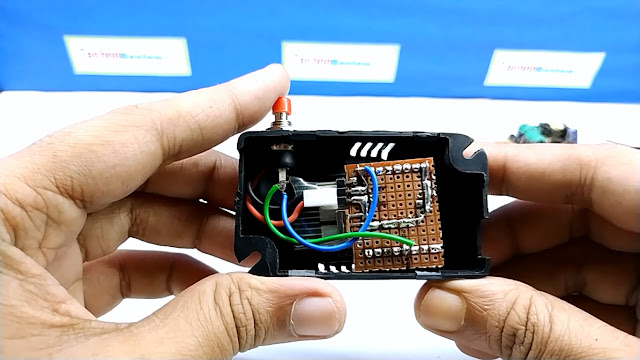
In this post, I am going to describe  how to make a very small spy camera with new low price development board ESP-32 cam. This cam module has a powerful esp32 chip, A micro SD card slot & a 2 MP camera. and you can program it using Arduino IDE How it works - When gpio 13 connect to gnd the camera module will take a photo & save it to Micro sd card. You need to make -  ESP32 cam module Small Vero board  Push Switch  Micro On-Off switch 10 K resistor 3.7 volt rechargeable battery Male / Female header pins  wire SD card A small box ( optional )  Circuit Diagram of this project After completed the connections upload the code to ESP32 cam using arduino IDE Download code from here  It may help you     How to program ESP 32 Cam module  

How to make radar using Arduino uno & processing IDE

Image
It is simple radar project using Arduino you need to make it .Arduino UNO 9G micro servo motor  Ultrasonic sensor hc-sr04 Bread board jumper wire  Download code & pde file from here Download processing IDE from here Connection- HC-sr04 Trig pin connect to Arduino Digital pin - D10 HC-sr04 Echo pin connect to Arduino Digital pin - D11 vcc to arduino 5V Gnd to Arduino Gnd Servo signal pin to Arduino Digital pin -D12 vcc to arduino 5V Gnd to Arduino Gnd After download Radar.zip file unzip it upload radar.ino file to Arduino using arduino IDE open radar.pde file using processing IDE change com port to your own com port witch is connected to Arduino UNO change resolution as per your computer resolution Now Run it Video of this project

How to make mini CNC plotter using old DVD drive

Image
It is a guide for making mini CNC plotter using old DVD drive stepper motor this machine can print up-to 40mm X 40mm I used here arduino nano & 2 piece  L293 dual motor driver IC as stepper motor driver The Pen mechanism of mini cnc collected also from old DVD driver (drawer part) For graphical user interface I have used a simple free Chrome extension named "Gcode sender" Download Gcode sender from here You need hardware  Old Dvd drive - 2piece ply wood 6X8 inch - 2piece Arduino nano 9g micro servo motor  vero board IC L293D - 2piece Male , Female header pins Terminal block LED 220 ohm resistor wire   Nut & screw   Assembling Hardware  First take out stepper motor from old DVD This video can help you  Mark on plywood for fit stepper motor mechanism & drill on mark. joint two ply wood like "L" using small piece of metal clamp  solder 4 wire on stepper motor connector points...

How to make simple Arduino clap switch

Image
In this post I will describe how to make easy clap switch using arduino you can on/off light or fan by clap You need to make it - Arduino UNO Sound sensor module Single channel relay module Some male,female jumper wire Small bread board Ac bulb or Fan                     Connection diagram Connection of relay module with a/c Relay & sound sensor's VCC will connect to Arduino 5 V GND will connect to Arduino GND Soun sensor out pin connect to Arduino pin 6 Relay module's input Pin connect to Arduino pin7 Download code for arduino from here  Watch making video of this project

Arduino password protected door lock system

Image
It is a password protected door lock project using arduino Press # for clear then press the password ( in my case it is 1234) and press * (star) for confirm. now servo motor on and door lock will open .after 5 sec it will automatically close. Parts need- arduino uno 4x4 Matrix  keyboard servo motor jumper wire power bank or battery for power supply bread board normal door lock resistor 220 ohms Connection - key pad pin            Arduino digital pin           1             to              9         2             to              8       3             to              7       4             to           ...

Obstacle avoiding robot v2 using arduino

Image
It is a basic Arduino robot project with simple code Parts list- L293D Motor driver module HC hr 04 ultrasonic module Arduino uno Jumper wire usb cable ( for power supply from power bank) Power bank 2WD robot chassis ------------------------------------------------------------------ You can make chassis from this video Connections- Hc 04 tring pin connect  to Arduino digital pin - 12 Hc 04 echo pin connect  to Arduino digital pin - 11 L293d motor driver input for left motor connect to Arduino digital pin 2 &3 L293d motor driver input for right motor connect to Arduino digital pin 4 &5   the power source of the project  is 5v from the power bank Download Arduino  code here  after downloading open it with Arduino Ide and upload to Arduino uno board Project Video-

How to make a graphical thermometer using arduino & nokia 5100 LCD

Image
It is simple arduino  thermometer project You Need-- Arduino UNO or any other arduino board Nokia 5100 LCD Module Analog Temperature sensor LM-35 Jumper wires Bread board or vero board battery here I use nokia  pcd 8544 - 1.4.3 library ( download library ) after add library You can get code in sample of 8544 library                                                Schematic of this project

Object detector using Arduino uno & ultrasonic sensor HC-sr04

Image
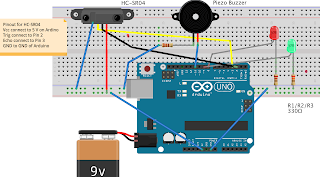
It is simple object detector project using arduino ultrasonic module Parts list-- Bread board LED ( RED & GREEN) Resistor -220 ohms Male to male jumper wire arduino uno arduino ultrasonic module ( HC-SR04) HC-SR04 connection VCC--5V GND--GND TRIG-- D2 ECHO-D3 LED RED -- D8 GND via resistor LED GREEN-- D9 GND via resistor PIEZO BUZZER --D11 GND--GND Supply 9V Battery ARDUINO CODE :- //Ultasonic Sensor //Pins connected to the ultrasonic sensor #define trigPin  2 #define echoPin 3 //LED pins #define ledGreen 9 #define ledRed 8 //Pin connected to the piezo buzzer #define alarm 11 int range = 5;//range in inches void setup() {   // initialize serial communication:   Serial.begin(9600);   //initialize the sensor pins   pinMode(trigPin, OUTPUT);   pinMode(echoPin, INPUT);   //initialize LED pins   pinMode(ledGreen, OUTPUT);   pinMode(ledRed, OUTPUT);   //set LEDs ...

how to connect arduino to android via bluetooth

Image
you need- arduino uno or other arduino board HC-05/HC-06 bluetooth module jumper wire 9v power or battery Download mobile app ardudroid or any other app from paly store send serial data 1  --glow led send serial data 0  -- put off led blutooth module HC-05 password 1234 connection vcc to 5v GND to GND RX to TX TX  to RX arduino code-- char data = 0;                //Variable for storing received data void setup()  {   Serial.begin(9600);         //Sets the data rate in bits per second (baud) for serial data transmission   pinMode(13, OUTPUT);        //Sets digital pin 13 as output pin } void loop() {   if(Serial.available() > 0)  // Send data only when you receive data:   {     data = Serial.read();      //Read the incoming data and store it into variable data     Serial.print(data)...